

Campus Call
Integrated Campus Operations Platform
Centralize the daily operations of educational institutions, from administration and IT to facilities, procurement, inventory and security, in one integrated platform.
Learn More about Campus CallComplete Farm Management System
Complete farm management, from seed to harvest.
Bring your entire growing operation into one place, from seed batches and growing areas to daily tasks, harvests and product traceability.
Overview
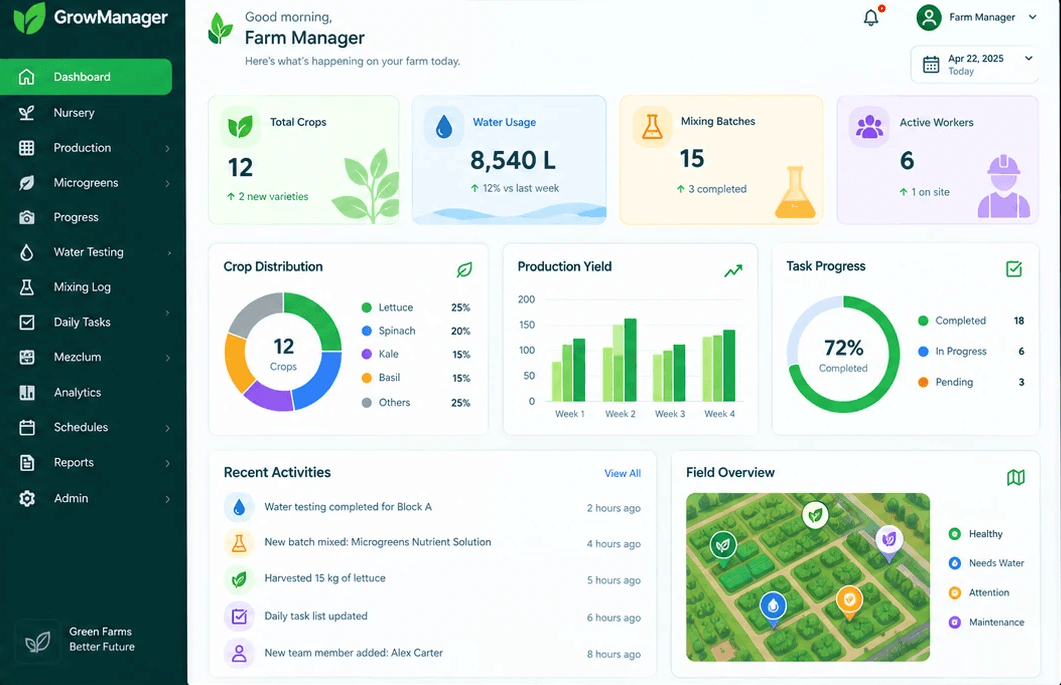
GrowManager is a modern farm management system designed to bring your entire growing operation into one place. Originally developed for Hidroponía Elche, it provides a centralized platform for managing crops, growing areas, seed batches, production activities, microgreens, nutrient solutions, daily tasks, harvests and traceability.
Whether you operate a hydroponic greenhouse, a traditional farm, a plant nursery, a vertical farm or a mixed agricultural business, GrowManager helps your team organize production, monitor crop progress, reduce waste and make better decisions using real operational data.
GrowManager runs in any modern web browser on computers, tablets and mobile devices. Team members sign in with their Google accounts once an administrator has invited them, and role-based permissions ensure everyone sees the tools and information relevant to their responsibilities.
Core features
See the farm at a glance: active batches, production pools, seedlings and trays, microgreens output, outstanding tasks and key indicators across growing areas, varieties and periods.
Register seed batches, record varieties, quantities and planting dates, organize trays, and track germination until seedlings are ready for transplanting.
Manage production through a visual grid of pools or growing areas, inspecting rows, trays, varieties, planting dates and days in growth. Adaptable to benches, field plots and vertical racks.
Follow each batch from planting through transplanting, harvesting and completion, with its variety, location, quantities and operational history.
Record plantings and track harvested, sold, discarded and growing product, with an activity log, lifecycle indicators and the status of active trays.
Capture and organize photos of trays and growing areas, review progress over time, and use AI-assisted tray-health checks as decision support alongside expert inspection.
Keep structured records of water tests and nutrient-solution measurements, such as pH and EC, linked to dates, batches or growing areas.
Document nutrient and solution preparation, including dates, details and quantities, so teams can follow repeatable procedures and troubleshoot differences.
Turn daily operations into a structured, printable task list organized by activity, growing area or workflow, from seeding and transplanting to harvesting and packaging.
Combine selected varieties into labelled mixes, record their components, and print QR-code labels that give customers access to the product’s traceability information.
Review production quantities, activity trends, crop and variety distribution, microgreens lifecycle and waste, and historical performance to support planning.
Plan recurring work and upcoming production activities, and coordinate growing, maintenance and harvesting.
Generate printable reports, with PDF or CSV exports where available, for management reviews, recordkeeping and analysis outside the application.
Invite users, assign permissions, manage crop varieties and reference data, and configure production pool designs and layouts to match how your farm works.
Trust by design
GrowManager is designed for controlled access within a farm team.
Users authenticate with their Google accounts.
An administrator must invite users before they can access the application.
Access to each section is controlled according to assigned permissions.
Team members can be given access to the tools needed for their work.
Authorized administrators manage users and supported application settings.
The GrowManager advantage
GrowManager brings production information, daily work and operational history together, instead of leaving them scattered across spreadsheets, paper records and separate tools.
See what is growing, what needs attention and how production is progressing.
Keep a structured history of batches, measurements, mixes and activities.
Organize daily activities and upcoming work so the team stays aligned.
Track each crop’s progress and product quantities from planting to harvest.
Connect finished products, including labelled mixes, to their recorded production information.
Spot opportunities to reduce waste and improve planning using recorded data.
Make operational decisions using recorded information rather than guesswork.
Who it’s for
Manage pools, trays, crop batches, nutrient solutions and harvests.
Organize growing zones, crop cycles, inspections and production tasks.
Track growing racks, trays, varieties and production cycles.
Manage seed batches, germination, seedlings and transplanting.
Track planting, harvesting, sales, discards and product preparation.
Organize plots, crop activities, inspections and daily operational records.
Bring different crops and growing workflows into a shared management environment.
FAQ
Don’t see your question? Our team is happy to help.
GrowManager is a farm management system that brings crops, growing areas, seed batches, production activities, microgreens, nutrient solutions, daily tasks, harvests and traceability into one centralized platform.
Its approach adapts to hydroponic farms, greenhouses, vertical farms, plant nurseries, microgreens producers, traditional farms and mixed farms. The exact configuration of each workflow depends on the farm’s layout and operational needs.
GrowManager runs in any modern web browser, on computers, tablets and mobile devices.
An administrator invites each user, who then signs in with a Google account. Permissions assigned to each user control which modules they can access.
No. AI-assisted tray-health checks help identify potential visual issues, but their assessments are decision-support information, not a replacement for expert inspection or laboratory testing.
We don’t advertise any hardware or external data integrations on this site. If these matter to you, contact us and we’ll tell you what is currently available.
Yes. Request a demo and our team will walk you through GrowManager and how it could fit your organization.
We don’t publish pricing on the website. Get in touch and we’ll discuss your organization’s needs and the options available.
Let’s build a smarter tomorrow
Request a demo and our team will show you how GrowManager can support your organization.
Explore more
Integrated Campus Operations Platform
Centralize the daily operations of educational institutions, from administration and IT to facilities, procurement, inventory and security, in one integrated platform.
Learn More about Campus Call
Complete School Athletics Management System
Organize, manage and develop your school’s entire sports programme in one centralized system, from teams and training to health readiness and equipment.
Learn More about Athletix School
Business Management & Financial Control
Bring properties, clients, services, invoicing, payments, expenses, tax administration and financial reporting together in one centralized workspace.
Learn More about ServiceHub